 Contact
  Calendars
 Careers
 Engage
  District

Raptor Safe App

Hello Jamestown Families,
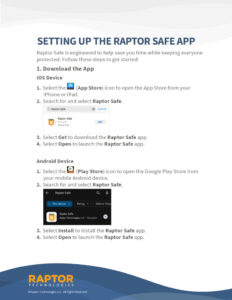
To make check-in easier, please ensure that you have set up your RaptorSafe app before visiting the school, if you haven’t already, to verify your identity. This makes the check-in process smoother and quicker.
Steps to get started:
Download the RaptorSafe app:
• App Store – https://apps.apple.com/us/app/raptor-safe/id6737568144
• Google Play – https://play.google.com/store/apps/details?id=com.raptortech.safe&hl=en_US
Follow the prompts to verify your identity within the app. Once set up, you’ll be able to check in quickly and easily during future visits, as the app will generate your “passport” (unique QR code) for check-in to scan. I have attached instructions for your convenience. Thank you for supporting our school’s safety procedures!
If you have any questions or need assistance. Please let me know!
Thank you!
DJ
Order your yearbook today! All orders will be completed online.
Please review our inclement weather procedures and ensure you have a plan in place with your family in the event we need to close schools or modify arrival or dismissal schedules due to weather.

Please SAVE the date for our Kindergarten Information Session Tour!